Scrolling
The color follows the page.
Vitrel reads the top left corner of the page and repaints the tabs and toolbar when it changes. Scroll the article and the color follows.
Scroll inside the window, or pick another tab.


A web browser for the Mac
Vitrel is a small browser built to use as little of your Mac as it can. It runs on the WebKit already in macOS, its tabs and toolbar use no CPU while idle, and it blocks ads and trackers by default.
Why it's efficient
01In the app
Vitrel runs on the WebKit that ships with macOS, the engine Safari uses. It bundles no copy of WebKit or Chromium, so it gets Apple's power tuning, hardware video decoding and memory handling, and engine updates arrive with macOS.
0browser engines bundled
02Measured
The tabs, toolbar and address bar run no timers, no polling and no idle animations. They do work only when you or the page do something. Even the toolbar's page color updates on events, never on a timer.
First build of the window and toolbar (Spike D), Release. App process, idle with a new tab, three tabs or Wikipedia open. In a 3 second sample, all 2,672 main-thread samples were waiting for events. M5 MacBook, macOS 27.0, 30 Sep 2026.
0.00%app CPU while idle
03In the app
Vitrel compiles the standard filter lists into WebKit's own content rules, on your Mac, and refreshes them daily. There's nothing to install or switch on, and a blocked ad or tracker is never downloaded, parsed or run. If a site breaks, the shield in the address bar turns protections off for that site.
The app's six lists: EasyList, EasyPrivacy, uBlock Origin's filters, privacy and quick fixes lists, and Peter Lowe's list, fetched 30 Sep 2026. 97.4% of their 163,040 filter rules convert; the rest are skipped, each with a reason. FilterKit's bench, M5 MacBook, macOS 27.0.
142,016WebKit rules from six lists
04In the app
When macOS runs short of memory, Vitrel puts background tabs to sleep, the ones you looked at longest ago first. A sleeping tab keeps its address, scroll position and history, frees the page, and loads it again when you come back. The tab in front, pinned tabs, and tabs playing media, using the camera or microphone, or holding a half-filled form stay awake. When Vitrel reopens your windows, only the tab in front of each one loads.
The memory this saves isn't measured yet.
1tab per window loads at launch
Blocking, measured
Eight news sites, each loaded with Vitrel's blocker off and on. Pick a site to see its requests.
Median time to load 946 ms with the blocker, from 1,938 ms without
46% fewer requests. 372 with the blocker off, 202 with it on. One dot per request.
How it was measured: M5 MacBook (10 cores, 24 GB), macOS 27.0, 30 Sep 2026. Vitrel's blocker in a WebKit test harness, all five lists and its scriptlets, against no blocking. Every load in a fresh web view with an empty cache and Safari's user agent, median of three loads, timed to WebKit's didFinish. On bbc.com blocking was 127 ms slower, within network noise at three runs. The eighth site, dailymail.co.uk, served a consent page (1 request either way); it counts toward the median but isn't drawn.
| Site | Load, off | Load, on | Requests, off | Requests, on |
|---|---|---|---|---|
| cnn.com | 1,613 ms | 1,412 ms | 142 | 97 |
| forbes.com | 5,738 ms | 967 ms | 250 | 110 |
| weather.com | 5,085 ms | 688 ms | 361 | 100 |
| huffpost.com | 6,130 ms | 955 ms | 250 | 90 |
| yahoo.com | 1,813 ms | 937 ms | 372 | 202 |
| theverge.com | 2,064 ms | 1,542 ms | 340 | 167 |
| bbc.com | 600 ms | 727 ms | 107 | 86 |
| dailymail.co.uk (consent page) | 528 ms | 487 ms | 1 | 1 |
| Median | 1,938 ms | 946 ms |
Speed, measured
Timed by the app itself, with its window hidden so the runs never reach the screen. These numbers compare Vitrel with itself. Side-by-side runs with other browsers come before the first release.
From opening the app to its first window, a new tab. Warm launch, median of 44. Debug build compiled like Release, M5 MacBook, macOS 27.0, 30 Sep 2026.
⌘T to the new tab's address bar ready for typing. Median of a measurement batch, slowest 3.2 ms. Same build and Mac, 30 Sep 2026.
From the command to the other tab's page shown and focused. Median of 10 switches between a page and a new tab, 90th percentile 2.5 ms. Same build and Mac, 30 Sep 2026.
Typing a site's name, then Return to its page on screen with content, with preloading on (the default). Median of 20 popular sites, 5 fresh runs each, real network. 746 ms with preloading off, 409 ms with the experimental top suggestion. Debug build, M5 MacBook, macOS 27.0, 1 Oct 2026.
And it looks like the page
Vitrel paints its tabs and toolbar in the color at the page's top left corner, so the page and the browser read as one surface. Same rule as everything else: the color changes only when the page does, and working out a new palette takes about 7 microseconds.
Median, Release build of the window and toolbar (Spike D), M5 MacBook, macOS 27.0, 30 Sep 2026.
Scrolling
Vitrel reads the top left corner of the page and repaints the tabs and toolbar when it changes. Scroll the article and the color follows.
Scroll inside the window, or pick another tab.
Sidebars
That corner is where documentation and app sidebars sit, so a dark sidebar carries straight up into the toolbar.
Contrast
The page color is copied as it is. Only the text changes, switching between dark and light to stay legible.
Dark pages
There's no border or inset around the page. When a site is dark, the whole window is dark.
New in the app
The pictures are snapshots of the app itself, taken with its window hidden. The sites in them are made up.
01In the app
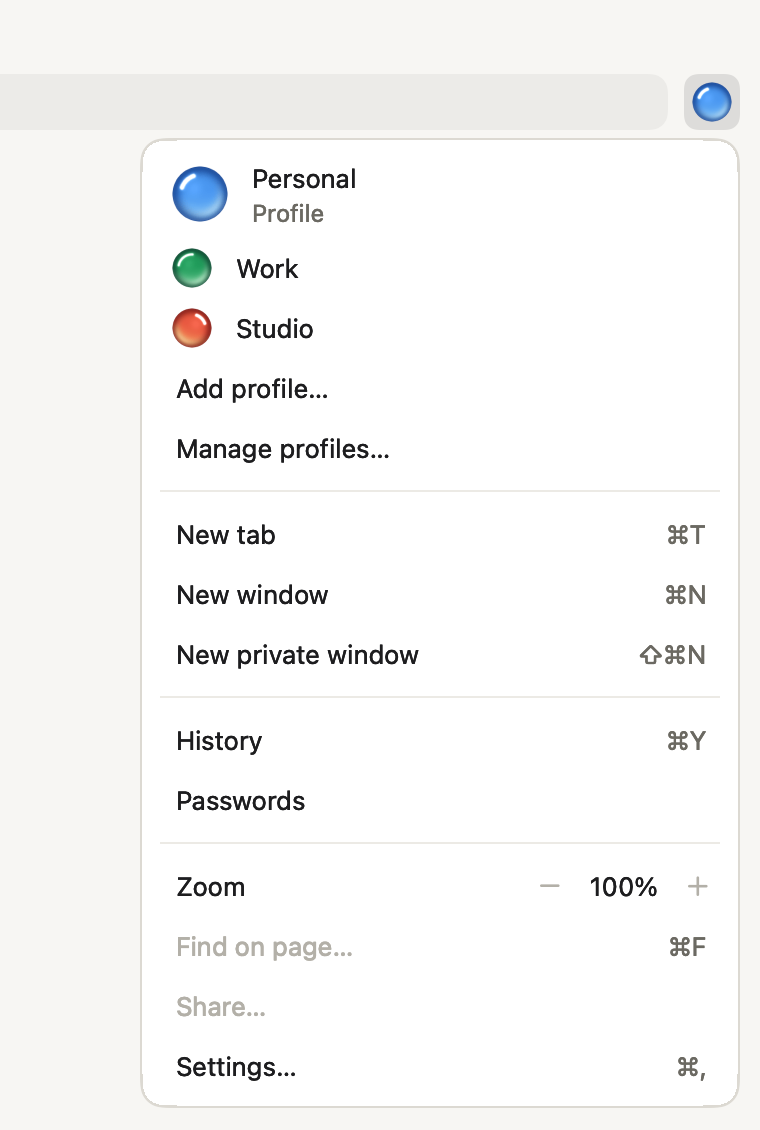
Keep work and home apart. Each profile has its own cookies, history, passwords, settings and extensions, and every window belongs to one. Give a profile one of twelve glass orbs or a picture of your own. The toolbar shows the window's profile, and the menu behind it lists the others.
A profile loads nothing until you open one of its windows.
02In the app, off until you turn it on
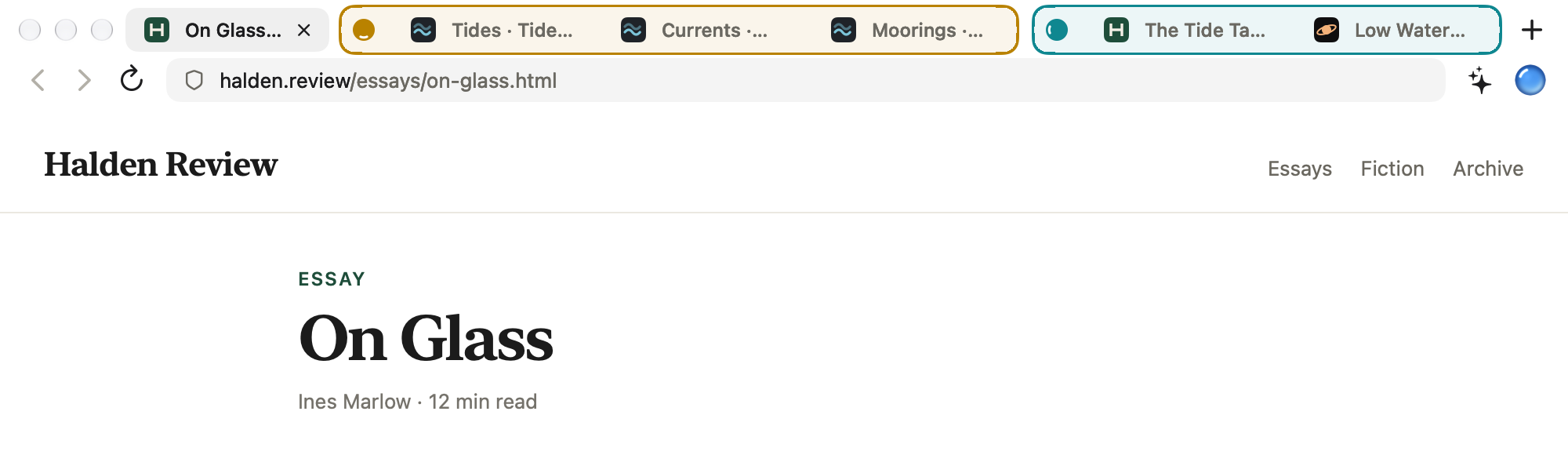
Turn on AI agents in Settings, and Connect Claude Code sets up Claude Code in one click. Other agents connect over MCP. You approve each agent before it starts. Its tabs open in the background, in a group of its own outlined in its color, and it never selects a tab, moves the focus or brings a window forward. Stop one agent from its group's menu, or all of them from the toolbar.
Groups for your own tabs are in progress.
03In the app
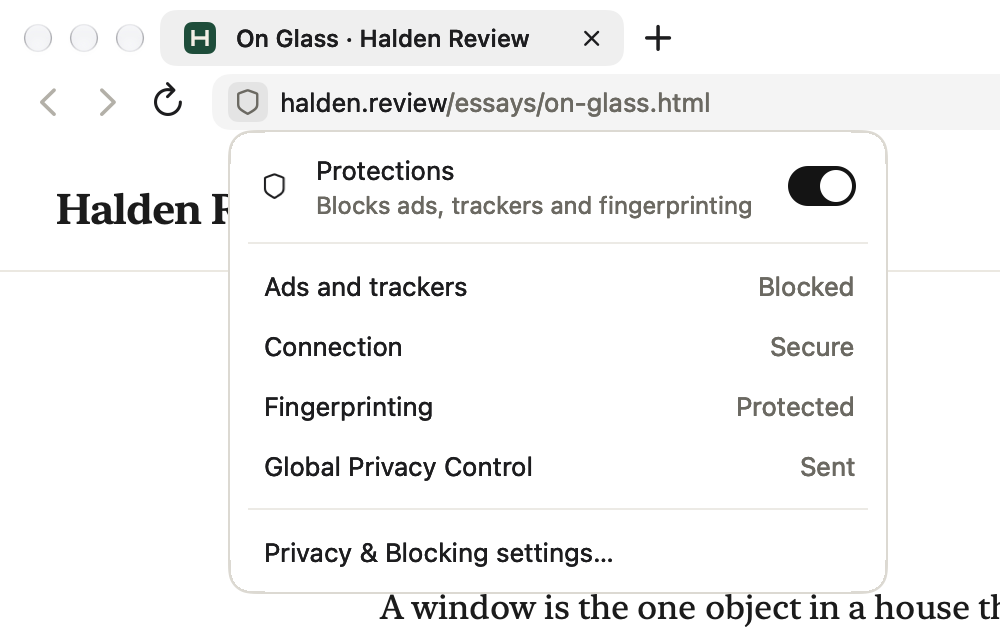
The shield in the address bar shows what Vitrel does on the page you're on: ads and trackers blocked, the connection, fingerprinting protection and Global Privacy Control. If a site doesn't work, one click turns protections off for that site and its subdomains, and Vitrel remembers it for that profile. Right-click the shield to do it without opening anything.
04In the app
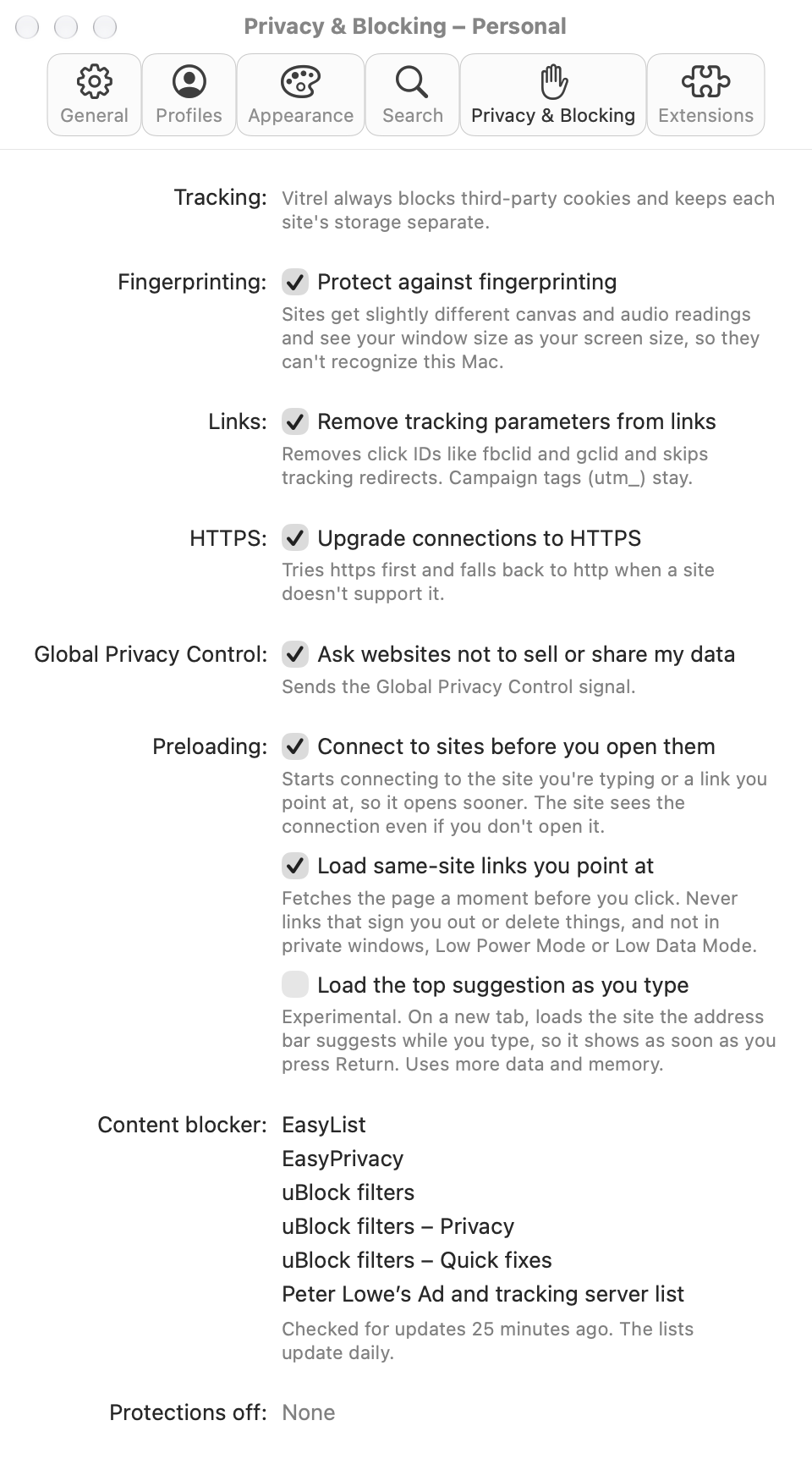
Every protection is on from the start: fingerprinting protection, tracking parameters taken out of links, HTTPS first and Global Privacy Control, and third-party cookies are always blocked. The same pane lists the blocker's six filter lists and when they were last checked, the sites you turned protections off for, and the preloading settings that open pages sooner.
Also in the app
There's no account and no telemetry. The privacy policy lists every request the app makes, and why.
Open an extension's page in the store and Vitrel offers to add it. It checks the package's signature and shows what the extension can access before you add it. Of 50 of the store's most used extensions, 42 work well and 8 partly work. See which ones.
Vitrel's compatibility probe, each extension installed in a hidden copy of the app. WebKit 625.1.29.11.25, 30 Sep 2026.
It saves and fills logins, suggests strong passwords, and imports a CSV export from another browser or password manager. Passwords stay in an encrypted file on your Mac, unlocked with Touch ID or your Mac password. Passwords don't sync.
No history, no saved tabs and no search suggestions sent. Cookies and site data stay in memory and are gone when the window closes.
Mac only. macOS 15.4 or later. Sign up for the alpha and we'll email you when it's ready.